Free Google review QR tool
Your review QR. Beautifully on brand.
Create print and digital pieces from your Google review link.
Create and preview freely.
Email required to download.
Design your kit.
Start with one format. Make it your own.
Add your review link
Example design shown until you add your link.
Opens your review link in a new tab.
Pick a style
All four includedEvery style supports your logo and brand colors.
Make it yours.
Counter card
Elegant Minimal
Choose a format
Start hereA flat card for a sign holder, acrylic stand or frame at reception or checkout. One flat front, not a fold-over tent.
Square edges fit standard holders. The QR stays square in every shape.
Includes a small “Powered by heywinflow.com” line at the bottom.
Make it yours
Included, freeYour logo stays on this device. We never upload it.
Keep it neutral: invite every client, and never offer a discount or gift for a review.
Your logo, business name and colors. In every style.
Live preview
Elegant Minimal / Counter card
Mira Hair Studio · Example brand and QR
4 x 6 in
Example QR: it opens this tool's page, not a review form. Add your review link to make yours.
Print-ready PDF 4 x 6 in counter card
Counter card
Elegant Minimal
Your design is ready
Get your free kit
$0 · Yours to keepEnter your email and complete the quick check to download.
Your kit is ready.
Your download is unlocked. One quick test, then it's ready for your salon.
Counter card
Elegant Minimal
Before you share it
- Test the QR. Scan the downloaded design with your phone. Check that it opens your salon's Google review form.
- Print at actual size. Use 100% scale and keep the clear space around the code. Test one print first.
- Invite an honest review. Place it where a friendly, natural invitation makes sense for every client.
Want a bespoke design? $50 one-time. Request a custom design
Optional custom design
Want something entirely yours?
Your branding is included in every free style. Choose bespoke if you'd like a design made from scratch.
This is a request, not a checkout. Nothing is charged on this page.
More ways to share
At the salon. After the visit.
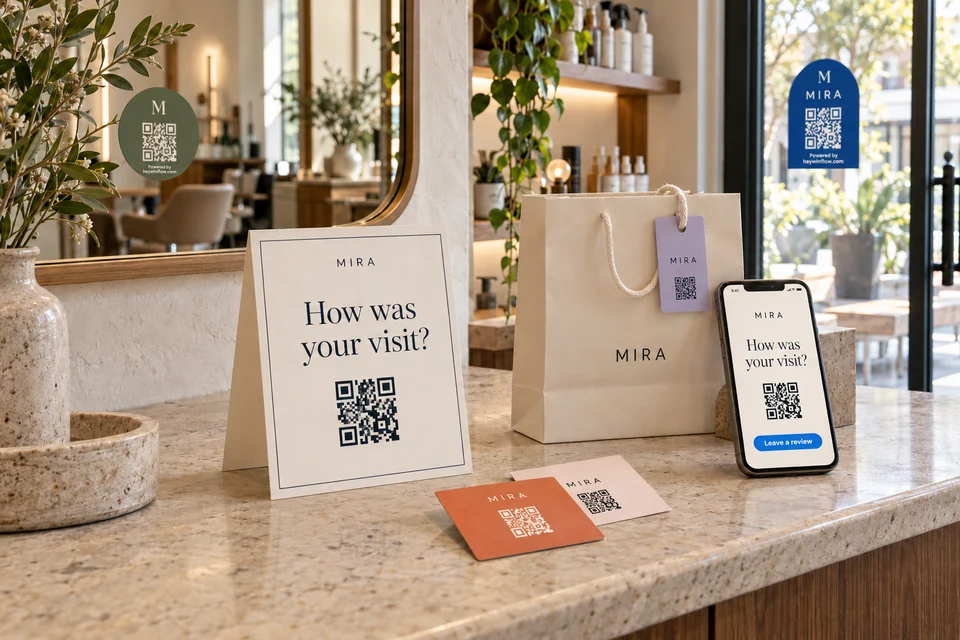
Window stickers, take-home cards, bag tags and digital follow-ups. Choose more formats whenever you're ready.
Find your Google review link
- Open your Business Profile. On a computer, sign in to the Google account that manages your salon and search your salon's name.
- Click "Ask for reviews". Some profiles show "Read reviews", then "Get more reviews".
- Copy the link and paste it in step 1. It usually starts with g.page/r/. The tool uses that direct link: no shortener, no tracking redirect.
Test your QR & prepare for print
- Every QR file is checked in your browser before you get it: it must read back your exact review link.
- Still scan your download with two different phones before printing a batch.
- Print PDFs are the exact size with 1/8 in bleed on every side. Print at 100% or "Actual size", never "Fit to page", and cut at the trim size in the print notes.
- PNG files are 300 dpi with the same bleed. The ZIP adds a cut-line file and print notes for your print shop.
- Keep the white square around the code clear and flat. Avoid glossy laminate where lights reflect.
- Counter card: a flat card for a sign holder or frame. Mirror sticker: beside the mirror, at a seated client's eye level. Window sticker: outdoor vinyl, readable from outside.
For words to use at the chair, by text and by email, see how to get more Google reviews for your salon.
Questions about the free kit
- Is it really free?
- Yes. All four styles, your logo, business name and colors, shapes, and every format are free. Stickers include a small Powered by heywinflow.com line. To download, we ask for your email and a quick security check. A custom design made from scratch is optional, at $50 one-time, by request.
- What does Google allow when I ask for reviews?
- Ask every client the same way, not just the ones you think loved it. Never offer a discount, a freebie or anything else in return for a review. See Google's tips on getting reviews.
- Does my logo get uploaded?
- No. Your designs are made in your browser and your logo stays on your device. We receive your email, your review link, your business name if you add it, and your choice about tips emails.
- Which formats and files do I get?
- Start with a counter card, mirror sticker, appointment card or window sticker. See more formats adds a receipt insert, aftercare card, retail-bag tag, email follow-up, SMS and WhatsApp messages and an Instagram Story. Print pieces come as a print PDF at the exact size with 1/8 in bleed, a 300 dpi PNG, or a ZIP with both, a cut line and print notes. Choose square, rounded or curved arch for print artwork. PDF pages stay rectangular: shaped pieces need cutting to the separate guide. Digital pieces come as images and copy-ready text with your direct link.
- Why doesn't the Instagram Story have a QR code?
- People watch Stories on the same phone they would scan with, so a QR code there can't be scanned. The Story artwork leaves a spot for Instagram's Link sticker, which you add with your review link when you post.
- Will the code stop working?
- The code opens your Google review link directly, with no redirect or tracking link in between, so it works as long as that link does. Nothing goes through our servers.